Types of Search Algorithms: Finding Things Fast
From linear and binary search to hash tables, trees, and graph algorithms like BFS, DFS, and A* — what each search algorithm does, its complexity, and how to pick the right one for your data.
Types of Search Algorithms: Finding Things Fast
Searching is one of the most common things a program does. Find a user by ID. Check whether a word is in a dictionary. Locate the shortest route between two cities. Every one of these is a search problem, and the algorithm you choose decides whether the answer comes back in microseconds or minutes.
This article walks through the main families of search algorithms, when each one fits, and how they compare. Code examples are in Python, but the ideas apply everywhere.
The Two Big Questions
Before picking an algorithm, answer two things:
- What is the data shaped like? A flat list? A sorted list? A tree? A graph of connected nodes?
- Is the data sorted or indexed? Sorted data unlocks dramatically faster algorithms; unsorted data mostly leaves you with brute force.
Everything below follows from those two answers.
1. Linear Search
The simplest algorithm there is: look at every element, one by one, until you find the target or run out.
def linear_search(items, target):
    for index, item in enumerate(items):
        if item == target:
            return index
    return -1
Time complexity: O(n) — in the worst case, you check every element. Works on: anything. Sorted, unsorted, lists, arrays, linked lists.
When to use it
- The data is unsorted and you only need to search it once (sorting first would cost more than the search).
- The collection is small — under a few dozen elements, linear search is often faster than anything else because it has zero setup cost.
- The data structure doesn't support random access (a linked list, a stream).
When not to
- You'll search the same data many times. Sort it or index it first.
- The collection is large and performance matters.
Linear search is underrated. For a list of 20 items, it beats binary search in practice. Don't reach for something clever when the simple thing is already fast enough.
2. Binary Search
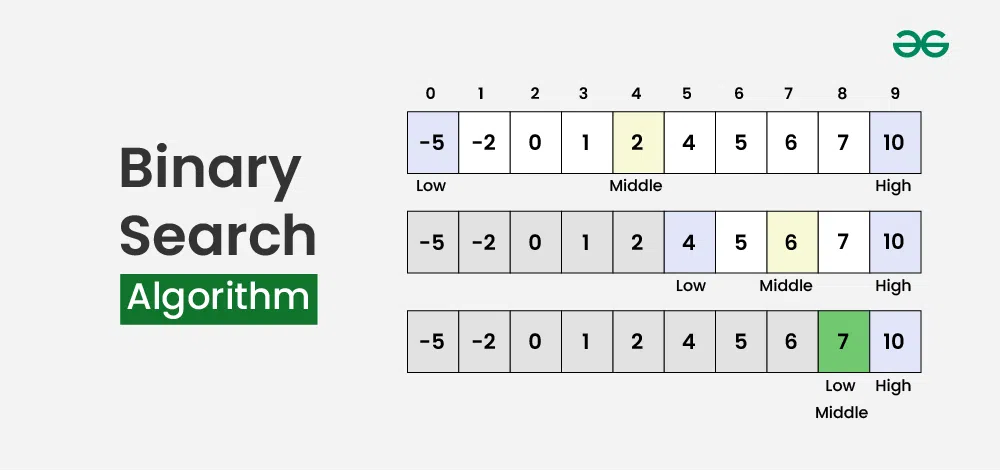
If the data is sorted, you can do much better. Look at the middle element. If the target is smaller, discard the right half; if larger, discard the left half. Repeat on what's left.
def binary_search(items, target):
    low, high = 0, len(items) - 1
    while low <= high:
        mid = (low + high) // 2
        if items[mid] == target:
            return mid
        elif items[mid] < target:
            low = mid + 1
        else:
            high = mid - 1
    return -1
Time complexity: O(log n). Each step halves the search space, so a million elements take about 20 comparisons; a billion take about 30. Works on: sorted arrays with random access.
When to use it
- The data is sorted (or you can sort it once and search many times).
- You need to find a value, or the position where a value would go (insertion point).
- You're searching for a threshold: "the first element greater than X", "the smallest value that satisfies some condition." This is called binary search on the answer and it shows up constantly in interview problems and in real optimization code.
Gotchas
- It only works on sorted data. Searching an unsorted list with binary search gives wrong answers silently.
- It needs O(1) random access. On a linked list, jumping to the middle costs O(n), which defeats the purpose.
- The classic off-by-one bugs: use
low <= high, update withmid + 1/mid - 1, and computemidaslow + (high - low) // 2in languages where integer overflow is possible.
Most standard libraries ship this already — Python's bisect module, Java's Arrays.binarySearch, C++'s std::lower_bound. Use those over hand-written versions in production.
3. Jump Search
A middle ground between linear and binary search. Jump ahead in fixed blocks of size √n; when you overshoot the target, do a linear search backward within that block.
import math

def jump_search(items, target):
    n = len(items)
    step = int(math.sqrt(n))
    prev = 0

    while items[min(step, n) - 1] < target:
        prev = step
        step += int(math.sqrt(n))
        if prev >= n:
            return -1

    for i in range(prev, min(step, n)):
        if items[i] == target:
            return i
    return -1
Time complexity: O(√n). Works on: sorted arrays.
When to use it
Rarely, in practice. Its one real advantage over binary search is that it only ever moves forward, then does a short backward scan — which matters on storage where jumping backward is expensive (tape drives, some sequential-access media). On a normal array, binary search wins.
4. Interpolation Search
Binary search always checks the middle. Interpolation search guesses where the target probably is based on its value — like opening a phone book near the back when you're looking for "Williams."
def interpolation_search(items, target):
    low, high = 0, len(items) - 1
    while low <= high and items[low] <= target <= items[high]:
        if items[low] == items[high]:
            return low if items[low] == target else -1
        # Estimate position proportionally
        pos = low + (target - items[low]) * (high - low) // (items[high] - items[low])
        if items[pos] == target:
            return pos
        elif items[pos] < target:
            low = pos + 1
        else:
            high = pos - 1
    return -1
Time complexity: O(log log n) on uniformly distributed data; O(n) in the worst case when the distribution is skewed. Works on: sorted numeric arrays where values are spread fairly evenly.
When to use it
- Large sorted arrays of numbers with a roughly uniform distribution (timestamps, sequential IDs with few gaps).
When not to
- Data is clustered or has outliers. A single huge value at the end ruins the position estimate and performance collapses to linear.
- The data isn't numeric or doesn't have a meaningful notion of "proportionally between."
5. Exponential Search
Useful when the array is unbounded or extremely large and you don't know its size. Start at index 1 and double: check indexes 1, 2, 4, 8, 16... until you find a value larger than the target. Then binary search in the last range.
def exponential_search(items, target):
    if items[0] == target:
        return 0
    bound = 1
    while bound < len(items) and items[bound] < target:
        bound *= 2
    # Binary search between bound/2 and min(bound, len-1)
    return binary_search(items[bound // 2 : min(bound, len(items))], target)
Time complexity: O(log i), where i is the position of the target. If the target is near the start, this is faster than plain binary search.
When to use it
- Unbounded or streaming sorted data where you can't compute
len(). - When the target is likely to be near the beginning of a huge array.
6. Hash-Based Lookup
Technically a data structure rather than an algorithm, but it's the most common way to "search" in real code, so it belongs here. A hash table computes a key's position directly from the key itself — no comparison, no scanning.
users_by_id = {101: "Alice", 205: "Bob", 317: "Carol"}

user = users_by_id.get(205)   # "Bob", in O(1) average time
Time complexity: O(1) average, O(n) worst case (when many keys collide). Works on: any data you can compute a hash for.
When to use it
- You need exact-match lookups by key, repeatedly.
- You can afford the extra memory for the table.
When not to
- You need range queries ("all users with ID between 100 and 200") or ordered traversal. Hash tables have no order; use a sorted structure or a tree.
- You need "closest match" or prefix matching.
For exact-key lookups, a hash table is almost always the right answer. Dictionaries, sets, and maps in every modern language are hash tables underneath.
7. Tree Search: Binary Search Trees
A binary search tree (BST) stores data so that everything in a node's left subtree is smaller and everything in its right subtree is larger. Searching is like binary search, but on a linked structure that supports fast inserts and deletes.
class Node:
    def __init__(self, key):
        self.key, self.left, self.right = key, None, None

def bst_search(node, target):
    while node is not None:
        if target == node.key:
            return node
        node = node.left if target < node.key else node.right
    return None
Time complexity: O(log n) if the tree is balanced; O(n) if it degenerates into a linked list (which happens if you insert sorted data into a naive BST).
When to use it
- You need a sorted collection that changes frequently. Sorted arrays are great for search but terrible for insertion (O(n) to shift elements). A balanced tree gives you O(log n) for search, insert, and delete.
- You need range queries, "find the next larger element," min/max, or ordered iteration.
In practice, use a self-balancing variant — red-black trees, AVL trees, or B-trees — which guarantee the O(log n) bound. Java's TreeMap, C++'s std::map, and every database index you've ever used are built on these.
8. Graph Search: BFS and DFS
When the data is a network of connected nodes — a social graph, a file system, a map, a game state space — you need graph search. The two foundational algorithms are breadth-first and depth-first search.
Breadth-First Search (BFS)
Explore all neighbors at distance 1, then all at distance 2, and so on. Uses a queue.
from collections import deque

def bfs(graph, start, target):
    visited = {start}
    queue = deque([(start, [start])])
    while queue:
        node, path = queue.popleft()
        if node == target:
            return path
        for neighbor in graph[node]:
            if neighbor not in visited:
                visited.add(neighbor)
                queue.append((neighbor, path + [neighbor]))
    return None
Finds: the shortest path (fewest edges) in an unweighted graph. Memory: can be high — it holds an entire "frontier" of nodes at once.
Depth-First Search (DFS)
Go as deep as possible down one branch before backtracking. Uses a stack (or recursion).
def dfs(graph, node, target, visited=None):
    if visited is None:
        visited = set()
    if node == target:
        return True
    visited.add(node)
    for neighbor in graph[node]:
        if neighbor not in visited and dfs(graph, neighbor, target, visited):
            return True
    return False
Finds: a path, not necessarily the shortest. Great for "does a path exist?", cycle detection, topological sorting, and exploring all possibilities (mazes, puzzles, backtracking problems). Memory: lower than BFS — only holds the current path.
Time complexity (both): O(V + E), where V is the number of nodes and E the number of edges.
Choosing between them
| Need | Use |
|---|---|
| Shortest path, unweighted | BFS |
| Any path / reachability | DFS |
| Exploring all solutions (backtracking) | DFS |
| Graph is very wide, solution is shallow | BFS |
| Graph is very deep, memory is tight | DFS |
9. Informed Search: Dijkstra and A*
BFS finds the shortest path when every edge costs the same. When edges have weights — road distances, network latency, action costs — you need something smarter.
Dijkstra's algorithm is BFS with a priority queue: always expand the node with the lowest total cost so far. It finds the cheapest path from a start node to every other node.
A* (A-star) adds a heuristic: an estimate of the remaining cost to the goal. Instead of exploring in every direction equally, it biases toward nodes that look closer to the target. With a good heuristic (like straight-line distance for maps), A* can be dramatically faster than Dijkstra while still guaranteeing the optimal path.
import heapq

def a_star(graph, start, goal, heuristic):
    open_set = [(heuristic(start), 0, start, [start])]
    best_cost = {start: 0}
    while open_set:
        _, cost, node, path = heapq.heappop(open_set)
        if node == goal:
            return path, cost
        for neighbor, weight in graph[node]:
            new_cost = cost + weight
            if new_cost < best_cost.get(neighbor, float("inf")):
                best_cost[neighbor] = new_cost
                priority = new_cost + heuristic(neighbor)
                heapq.heappush(open_set, (priority, new_cost, neighbor, path + [neighbor]))
    return None, float("inf")
When to use them
- Dijkstra: weighted graph, no good heuristic available, or you need shortest paths to all nodes.
- A*: weighted graph, single target, and you have a reasonable estimate of remaining distance. This is the algorithm behind GPS navigation and game pathfinding.
Comparison at a Glance
| Algorithm | Data requirement | Best | Average | Worst | Typical use |
|---|---|---|---|---|---|
| Linear | None | O(1) | O(n) | O(n) | Small or unsorted lists |
| Binary | Sorted array | O(1) | O(log n) | O(log n) | Sorted lookups, thresholds |
| Jump | Sorted array | O(1) | O(√n) | O(√n) | Forward-only media |
| Interpolation | Sorted, uniform numeric | O(1) | O(log log n) | O(n) | Evenly spread numbers |
| Exponential | Sorted, unbounded | O(1) | O(log i) | O(log i) | Unknown-size data |
| Hash table | Hashable keys | O(1) | O(1) | O(n) | Exact-match lookups |
| BST (balanced) | Ordered keys | O(1) | O(log n) | O(log n) | Dynamic sorted sets, ranges |
| BFS / DFS | Graph | — | O(V + E) | O(V + E) | Paths, reachability |
| Dijkstra | Weighted graph | — | O((V + E) log V) | O((V + E) log V) | Cheapest paths |
| A* | Weighted graph + heuristic | — | Depends on heuristic | O(V + E) log V | Navigation, game AI |
How to Choose
Walk through these questions in order:
- Is it a graph? → BFS/DFS for unweighted, Dijkstra/A* for weighted.
- Do you need exact-match lookups by key, many times? → Hash table.
- Does the data change often and need to stay sorted? → Balanced tree.
- Is the data sorted and static? → Binary search (or interpolation if it's uniform numeric).
- Is it small or you only search once? → Linear search. Don't overthink it.
Summary
There's no single "best" search algorithm — there's the right one for the shape of your data. Linear search for the trivial cases, binary search when things are sorted, hash tables for exact lookups, trees when data changes, and graph algorithms when relationships matter.
The real skill isn't memorizing implementations (your standard library has them). It's recognizing which shape your problem has, so you reach for the right tool before you start typing.